Support operations
Organize incoming requests and team priorities.
Map request types to queues and owners, define service commitments, and review workload and service status.
The product
Connect intake, bots, routing and service targets in workflows you configure. Use AI assistance where it fits, with your team in control of the customer experience.
01 / Your support operation
Bring email and embedded support into a ticket workflow. Capture the issue, the relevant product and the context your team needs to respond.
From question to conversation
Illustrative intake journey. Channel setup varies.
02 / Your support operation
Organize requests into queues and route them around your support process. Use custom fields and views to help agents find and prioritize their work.
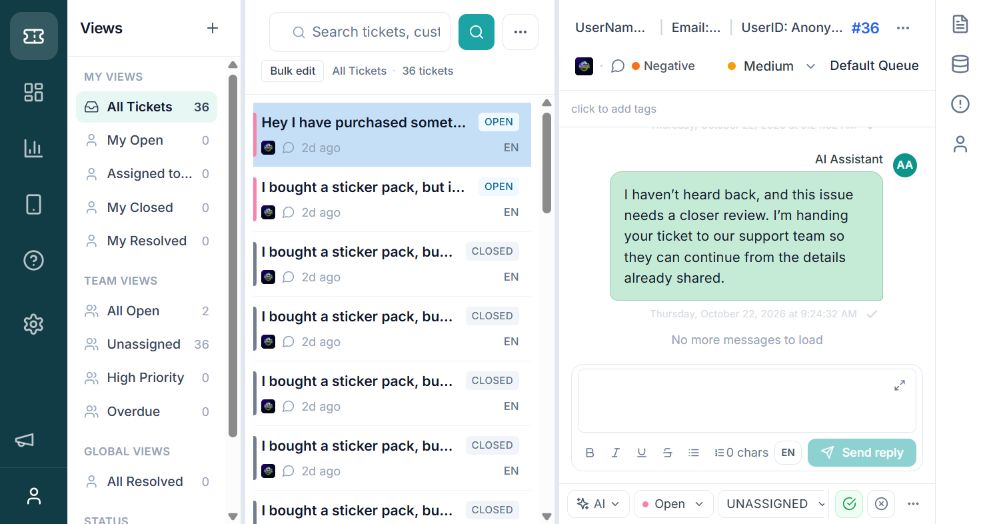
03 / Your support operation
Define response and resolution targets with business hours, holidays and pause rules. See which conversations are on track, due soon or overdue.
Make the commitment explicit
Set the initial response commitment
Keep the conversation moving
Track the path to closure
Configure business hours, holidays and pause rules for the applicable policy.
04 / Your support operation
Configure rules around ticket events, conditions and actions. Use reusable replies for common questions and reports to review how the work is progressing.

Bots and guided flows
Build bot flows to ask questions, collect information and categorize requests before handing the conversation to your team.
Configure branches and actions around the customer journey you want to support. Test the paths and handoffs with your team before launch.
See bots in a demo
Support analytics
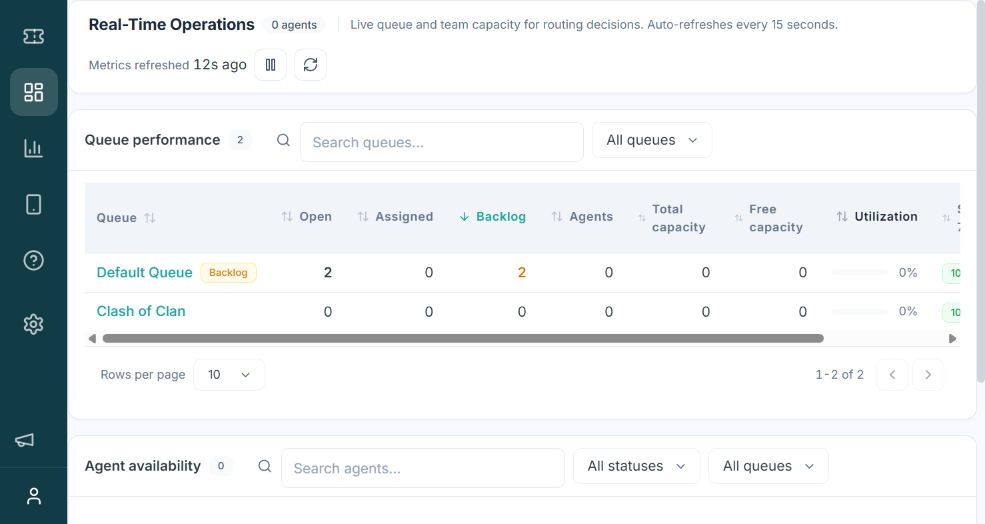
Review queue and agent activity, response performance and service-target status. Use the findings to refine routing, team priorities and workflow rules.
AI in your support workflow
Use configured knowledge to support AI responses and carry context into a handoff when a person needs to help.
Availability, data processing and supported actions depend on the agreed setup. Include answer quality, exceptions and human review in your pilot rather than assuming a particular automation outcome.
Review security and AI controls ↗Support workflows
Coordinate requests across queues, products and specialist teams while keeping customer context and ownership clear.
Support operations
Map request types to queues and owners, define service commitments, and review workload and service status.
Complex escalations
Capture product and issue details, coordinate with specialists, and connect the agreed engineering workflow.
Multiple products and teams
Organize product context and fields, configure routing and views, and review access and reporting needs.
Connected tools
Connect customer messages to support tickets, keep teams informed about ticket and SLA changes, and coordinate engineering work.
Team notifications
Keep your team informed in Slack channels.
Send notifications for ticket updates, customer replies and SLA warnings or breaches based on the events you select.
Connect your Slack workspace, grant channel access and choose the events and destinations for your notifications.
Team notifications
Bring support updates into Teams channels.
Notify colleagues when tickets change or SLAs need attention, with ticket context and a link back to the workspace.
Authorize your Microsoft tenant and select the Teams channels that should receive ticket and SLA notifications.
Customer messaging
Turn WhatsApp conversations into support tickets.
Messages to your connected business number create or update tickets, so agents can respond from ClariconOps.
Connect a WhatsApp Business number through Meta and configure inbound messaging. WhatsApp messaging policies apply.
Customer messaging
Manage Facebook Page messages as support tickets.
Private messages to your connected Page create or update tickets, with agent replies sent back through Messenger.
Authorize a Facebook Page administrator and configure Page permissions and webhooks. Meta approval requirements apply.
Customer messaging
Bring community support into your ticket workflow.
Turn bot DMs and messages in configured support channels into tickets, and send agent replies back to Discord.
Connect your Discord bot and choose support channels. Server channel messages require the Message Content intent and channel permissions.
Support intake
Keep email requests in the support workspace.
Convert incoming support emails into tickets and keep follow-up replies with the customer conversation.
Configure your support mailbox and sender details, then verify inbound delivery and outbound replies.
Engineering collaboration
Turn support escalations into Jira work items.
Create an issue in your selected project from support events, carrying ticket context into the engineering workflow.
Connect your Jira site, select a project and issue type, and configure which support events should create work items.
Custom connections
Connect support events to your own systems.
Use webhooks and APIs to exchange ticket information and trigger actions in your existing applications.
Configure authenticated endpoints, select the events and data you need, and verify delivery with your application.
Configure connections and event rules for your workspace. Messaging channels require the relevant business account, bot or Page. Product names and logos belong to their respective owners.
SDK integrations
Explore web, mobile and game integration options with our team. Packaging, distribution and device validation vary by platform.
| Platform | What to confirm |
|---|---|
| Web | Hosted widget or package installation, allowed origins and user identity. |
| Android & iOS | Distribution access, supported toolchain, signed user identity and physical-device acceptance. |
| Flutter & React Native | Package access, native setup and end-to-end device checks. |
| Unity & Cocos | Supported native build, WebView requirements, distribution access and device acceptance. |
Ask our team for installation access, supported versions and platform requirements before scheduling your rollout.
Security & enterprise controls
Use these topics to guide your organization’s review. Confirm deployment details and supporting documentation with our team.
Review identity-provider setup, account access and the sign-in policy for your organization.
Confirm your identity provider, supported protocol and enforcement requirements.
Roles and permissions help organize access. Audit features provide records for supported actions.
Confirm role boundaries, audit coverage, access reviews and offboarding.
Support conversations can include customer details and attachments. Review intended data flows before using production information.
Confirm hosting, retention, deletion, export and any residency requirements.
Agree which data an AI provider processes and which actions it can take.
Review provider, processing location, retention, human review and failure handling.
This overview supports an initial review. Certifications and contractual service commitments must be verified separately.
Discuss your requirements with our team ↗Implementation & evaluation
Map the workflow, configure the workspace, then test typical requests and exceptions with a focused team.
See it with your workflow
Explore how automation, bots and AI assistance fit your support process. Request a demo or a workspace for your team.


